This is part of our Ultimate Guide to Qualitative Software | Start a Free Trial of Delve | Take Our Free Online Qualitative Data Analysis Course
When conducting qualitative research, AI can help brainstorm a first set of codes, spot overlapping ideas, play devil’s advocate on specific coding decisions, and even help apply a codebook. But ask a tool like ChatGPT something broad like “what are the themes in my data,” and the answer usually sounds somewhat plausible while saying very little about your actual data.
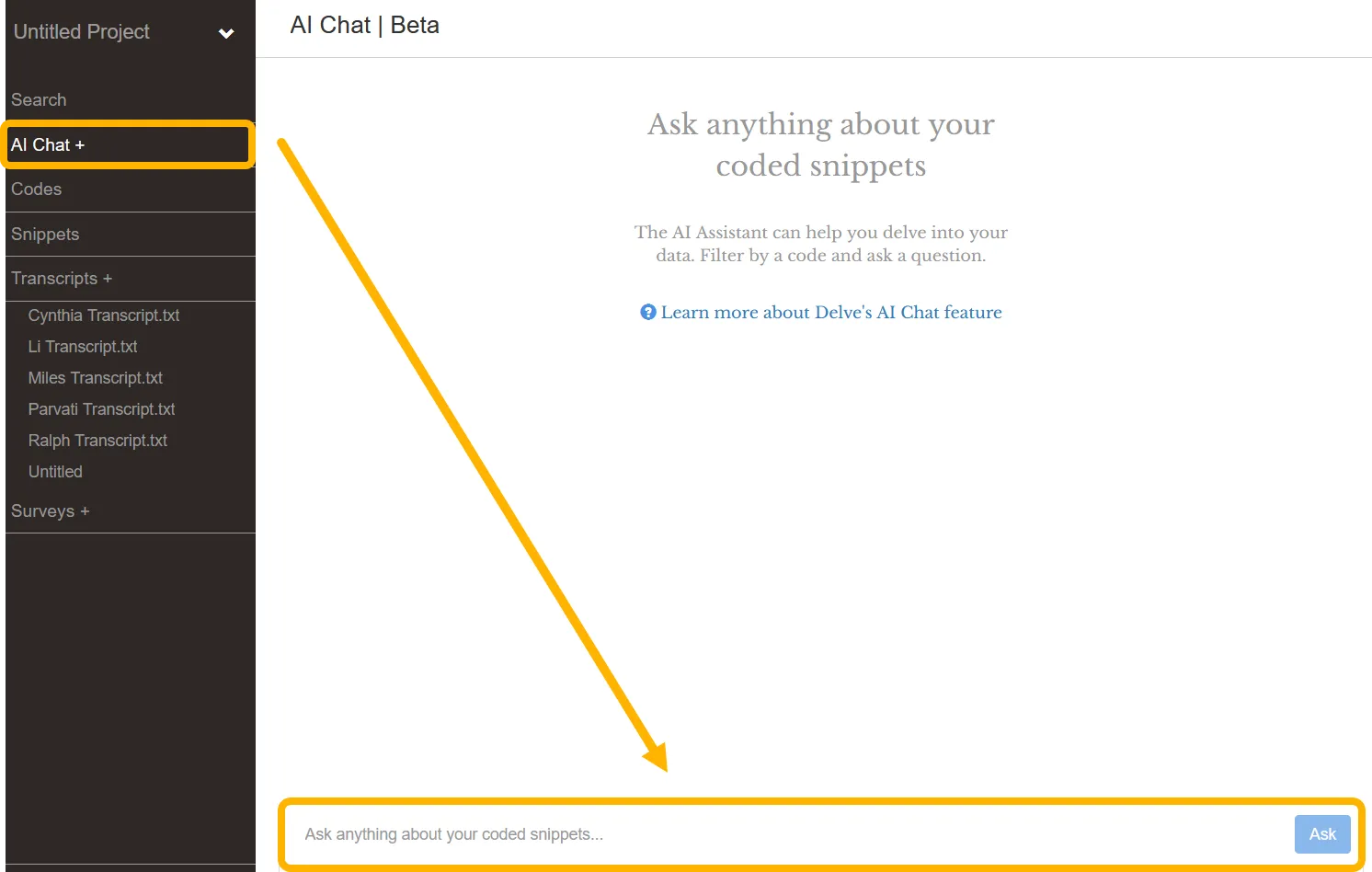
The difference between a sharp AI output and a vague one is your prompt, and writing them well is a skill you’ll lean on beyond just this project. Delve offers AI in a few spots within the qualitative workflow, and we’ll show how to use these tools for better research results in less time.
What makes a good AI prompt in qualitative analysis?
AI doesn’t know your theoretical framework, your own experiences, or what a participant means underneath the literal words they use. It reads fast and spots patterns across a lot of data, but reading those results against your own perspective is your job. That reflexivity, staying aware of your own lens, is why AI is more of a research assistant than a replacement for researchers.
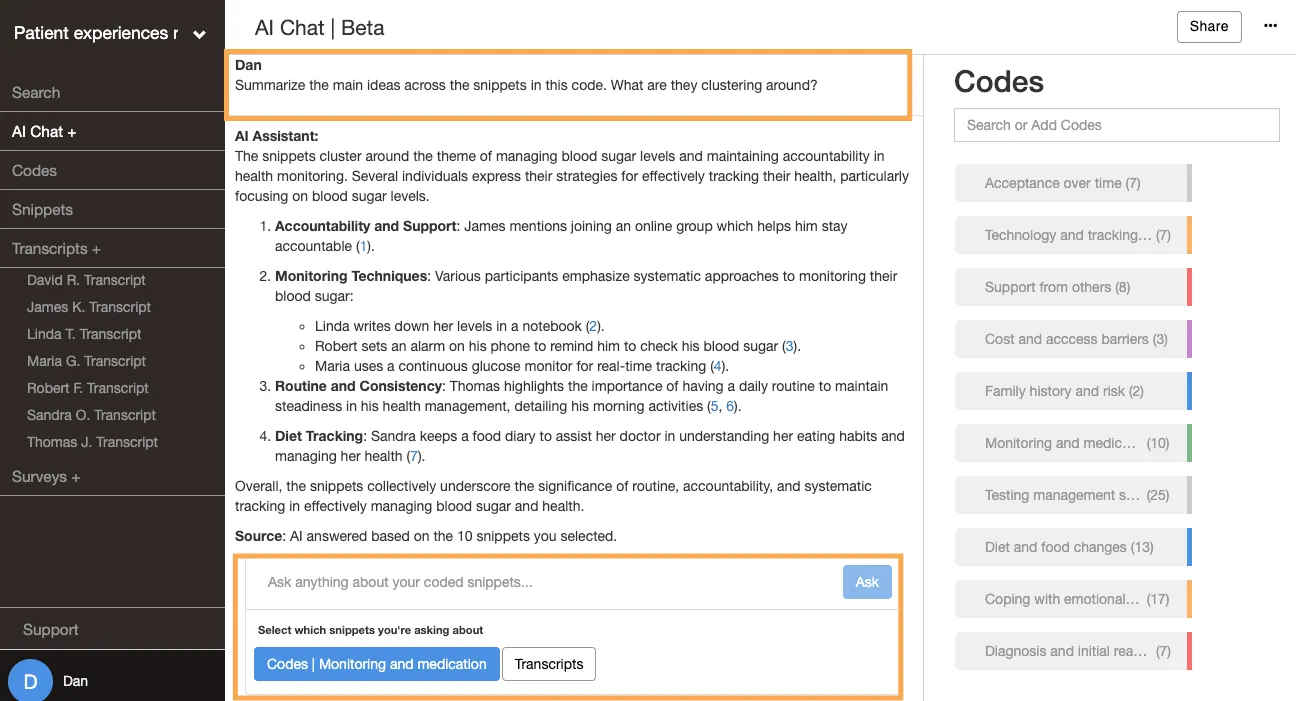
That’s why a wide open prompt gets you a wide open answer. Say you ask the AI to “Summarize the main ideas across the snippets of the code Monitoring and medication.” The answer will be fairly flat, and likely confirm what you know more than add much to it. Vague prompts can also leave gaps where AI fills in the missing context with confident (but made up) answers.
Now say you send a more specific prompt based on the same code. Maybe you’ve noticed participants fit new health habits into routines they already have, so you dig into that concept. “Summarize this code, focusing on how participants build checking and medication into routines they already have. For each, note the existing habit it’s anchored to.” Now the answer is organized around that idea, going transcript by transcript and naming the habit each one anchors to.
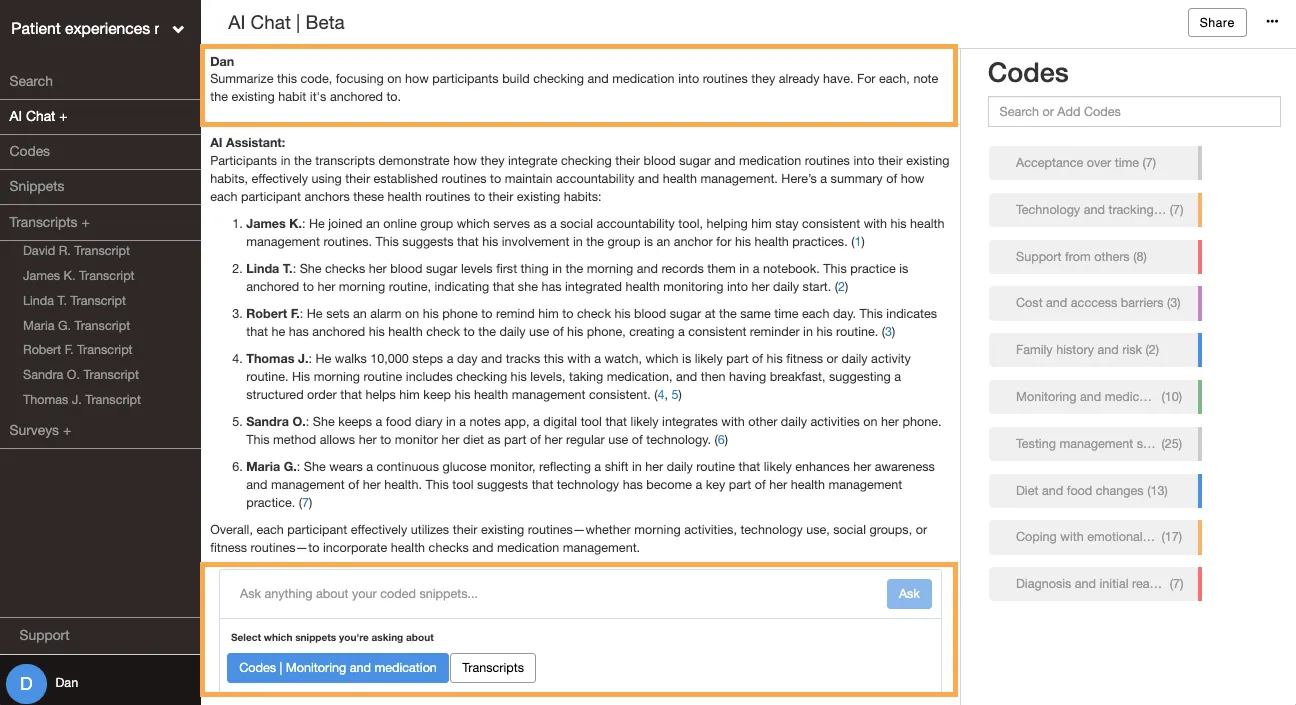
The second prompt tightens the scope, and draws mostly from what you already knew about your data. A good prompt gives clear instructions for what you want it to apply instead of an unspecific, open question with room for error. Delve gives you three AI tools at different points in your project to work with:
- Transcript AI, for brainstorming when you’re starting out
- Apply Codes Using AI, for coding a transcript with your existing codebook
- AI Chat, for exploring the snippets once you’ve coded them
Brainstorm your first codes with Transcript AI

Transcript AI is the place to start if you’re starting with fresh transcripts. You access it at any time with the AI button on each transcript page. This AI reads in the current transcript plus whatever codebook you’ve already built. You prompt it by typing a question and it can help brainstorm initial codes, summarize the transcript, or find relevant quotes.
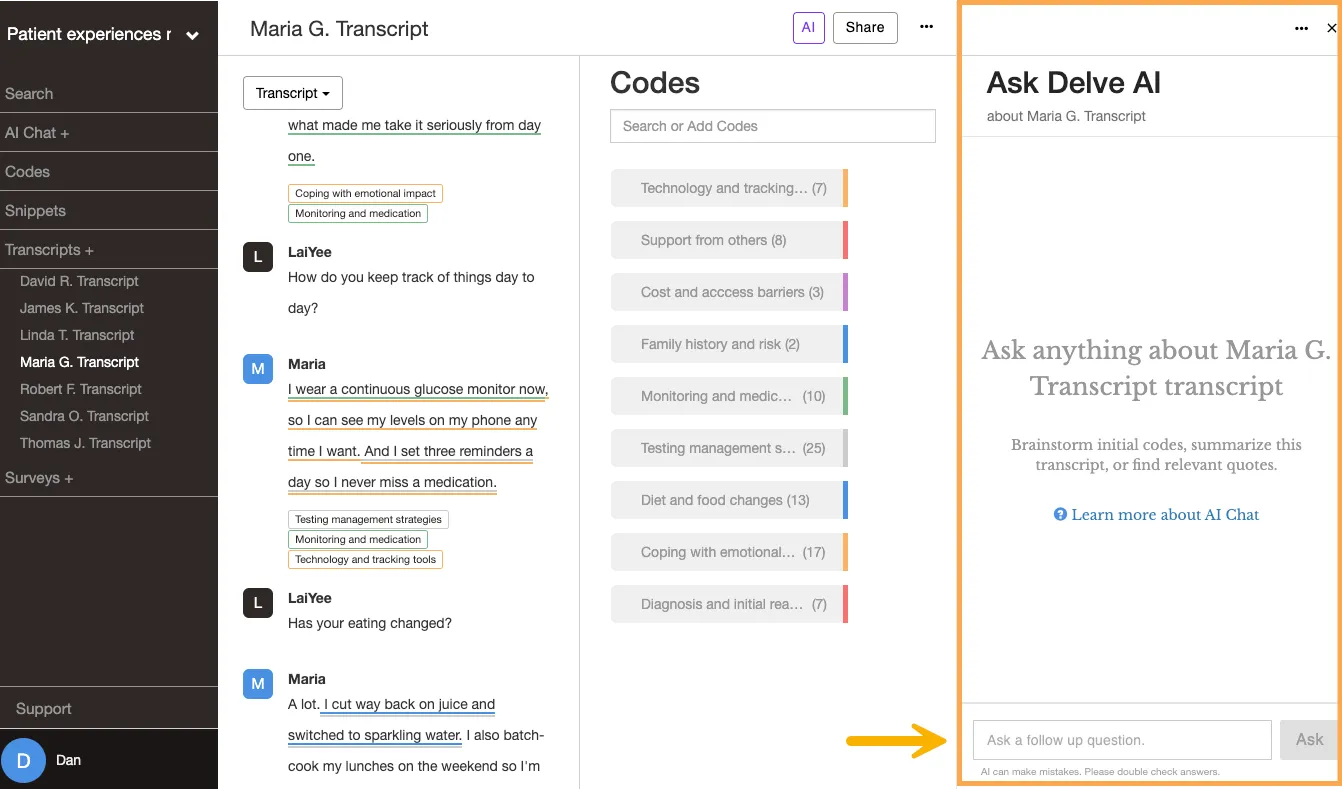
Useful first prompts for Transcript AI:
- “Suggest some initial codes for this transcript.”
- “Summarize this interview in three sentences.”
- “What stands out here that connects to my research question about daily management?”
Treat what comes back as a first draft of ideas, not as conclusive results. Transcript AI suggests, and you decide. It reads one transcript at a time, so a code that looks right in one interview might not hold up across your whole project. This is a great way to spark ideas, and build from there.
Use code descriptions for the AI coding assistant
Once you’ve created a few codes in your codebook, Delve can apply that codebook across a transcript for you. There’s no chat box, so it looks different than the other AI tools. It reads your code names and the first paragraph of each code description to decide what to tag. The code description is the prompt.
.U9fZEEL7_BGhfJ.webp?dpl=dpl_ERESCkC5BzAKyvG6TjTCMrMtYS2C)
The more clearly you define what fits the code and what falls outside it, the more accurately the AI tags it. This is deductive coding, where the AI applies the codebook you’ve already defined, then you review the results. One-word labels give it little to go on, which gives it more room for error and hallucinations.
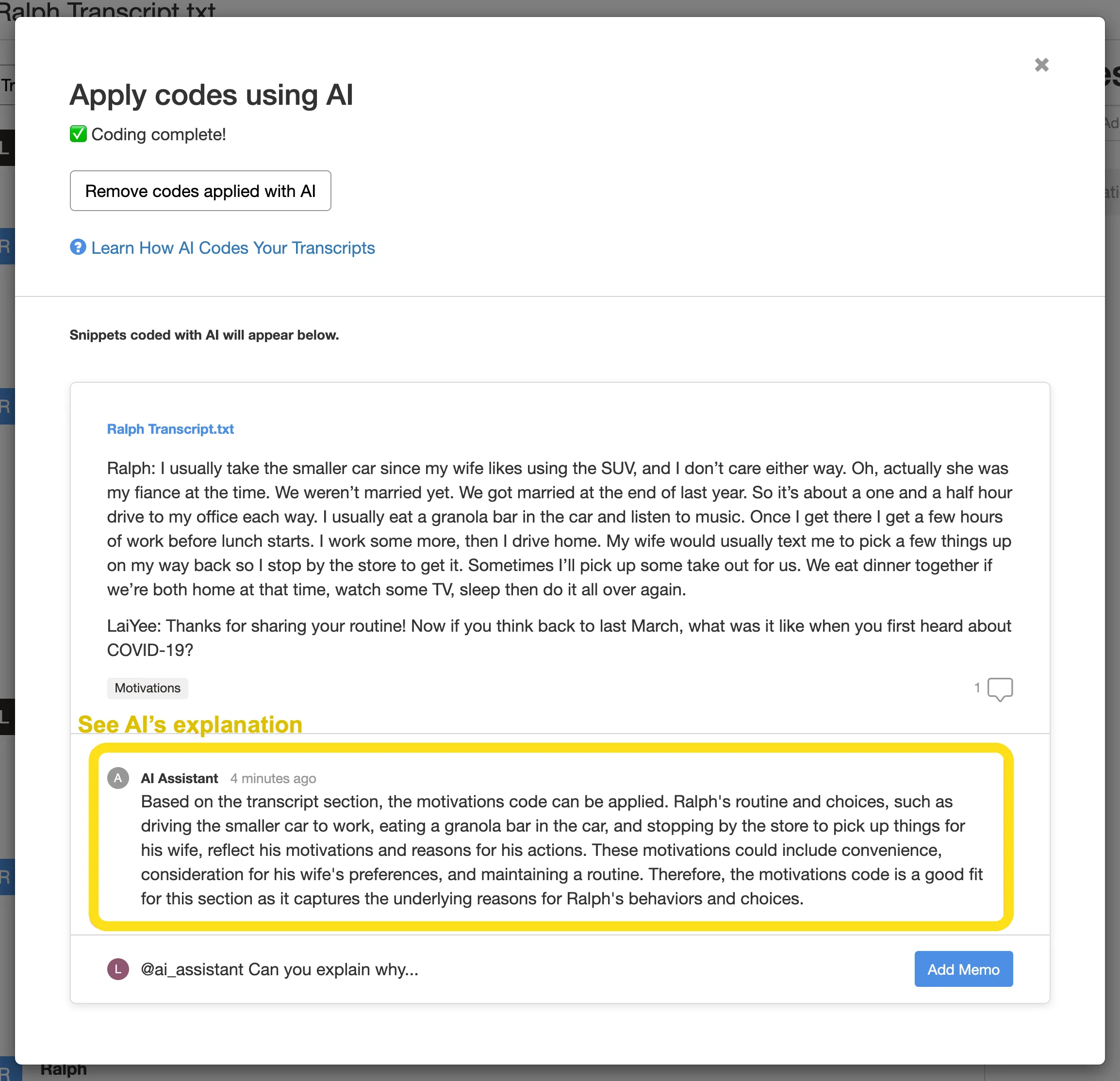
The better the code descriptions, the less cleanup you do after. You can also remove all codes applied with AI in one click if you don’t agree with the bulk of decisions.
Explore all of your coded snippets with AI Chat
Once you have coded your data yourself, AI Chat basically turns into your full blown research assistant. You can also think of it like a peer debriefer when you need a fresh set of eyes. It lives in the left menu, and you can point it at different parts of your data with filters before you prompt.
Filtering AI Chat to a single transcript is not the same as running Transcript AI on it. AI Chat only ever reads the snippets that you’ve coded. Filter it to one interview and it reads the coded snippets in that interview, nothing else. Transcript AI reads the whole transcript, coded or not. So AI Chat shows you what you’ve already pulled out of an interview to code, while Transcript AI shows you everything in it. That’s why Transcript AI fits the early explorations and AI Chat fits later, once you have coded snippets to work with.
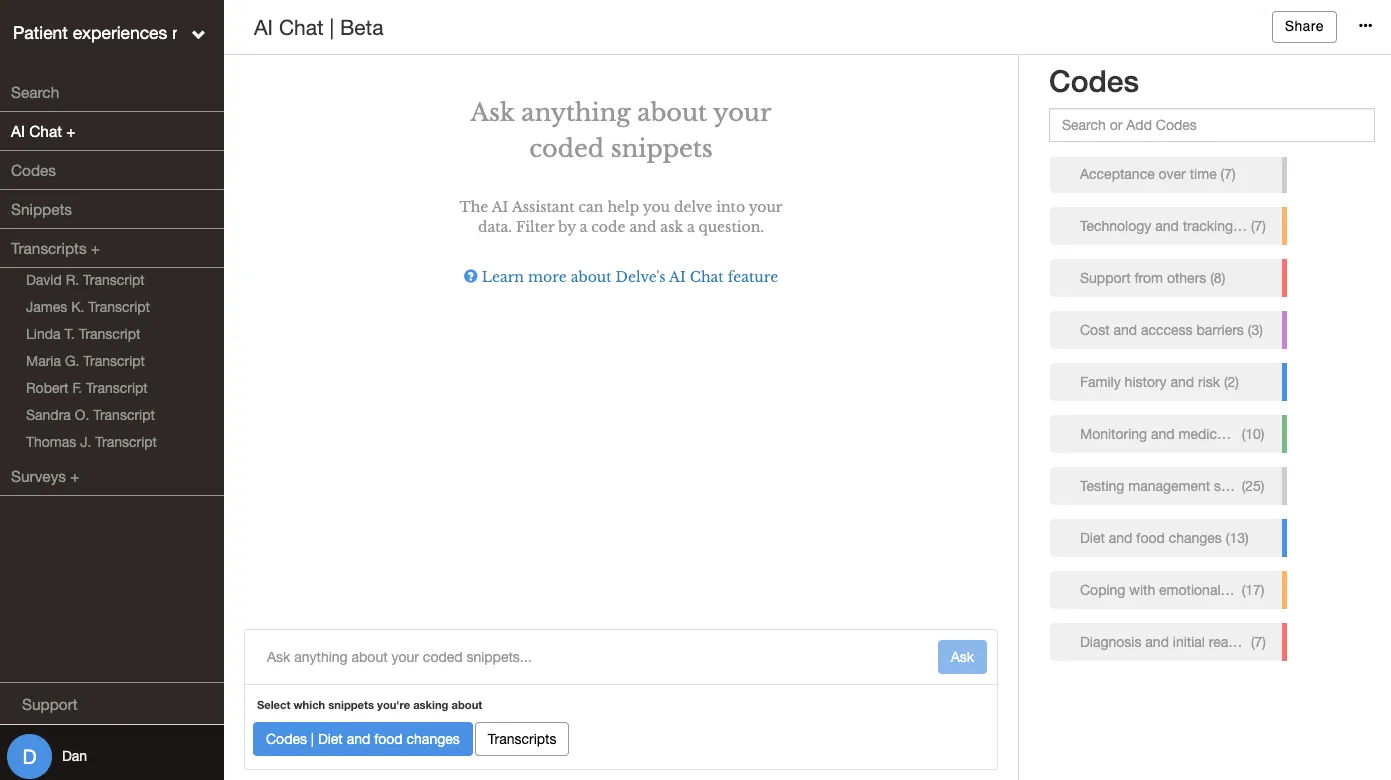
💡 AI Chat considers every coded snippet across all your transcripts and codes. Filtering narrows to just the codes or transcripts you want to work with. Narrowing sharpens the answer, and it helps more on large projects, since the AI has a limited memory to work with.
Four AI Chat prompts you can use with the filters applied
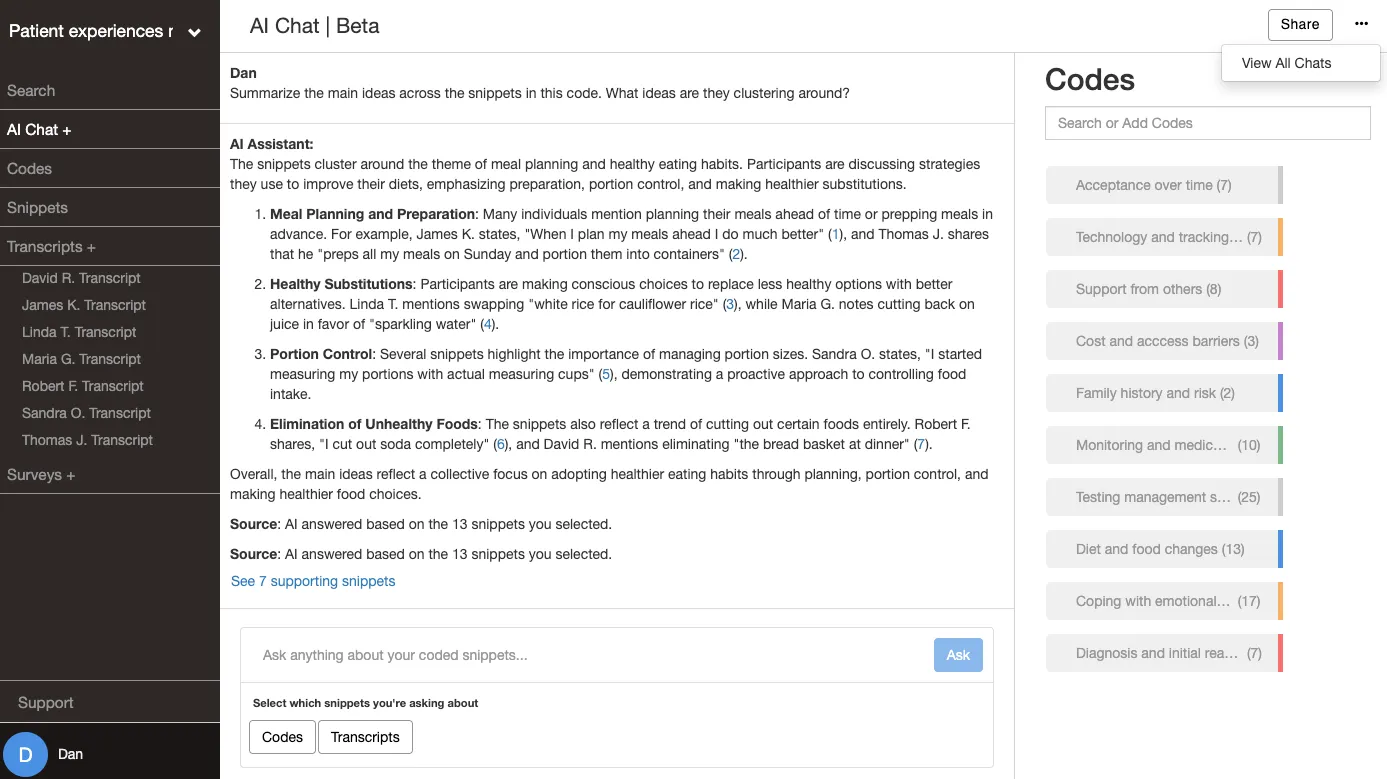
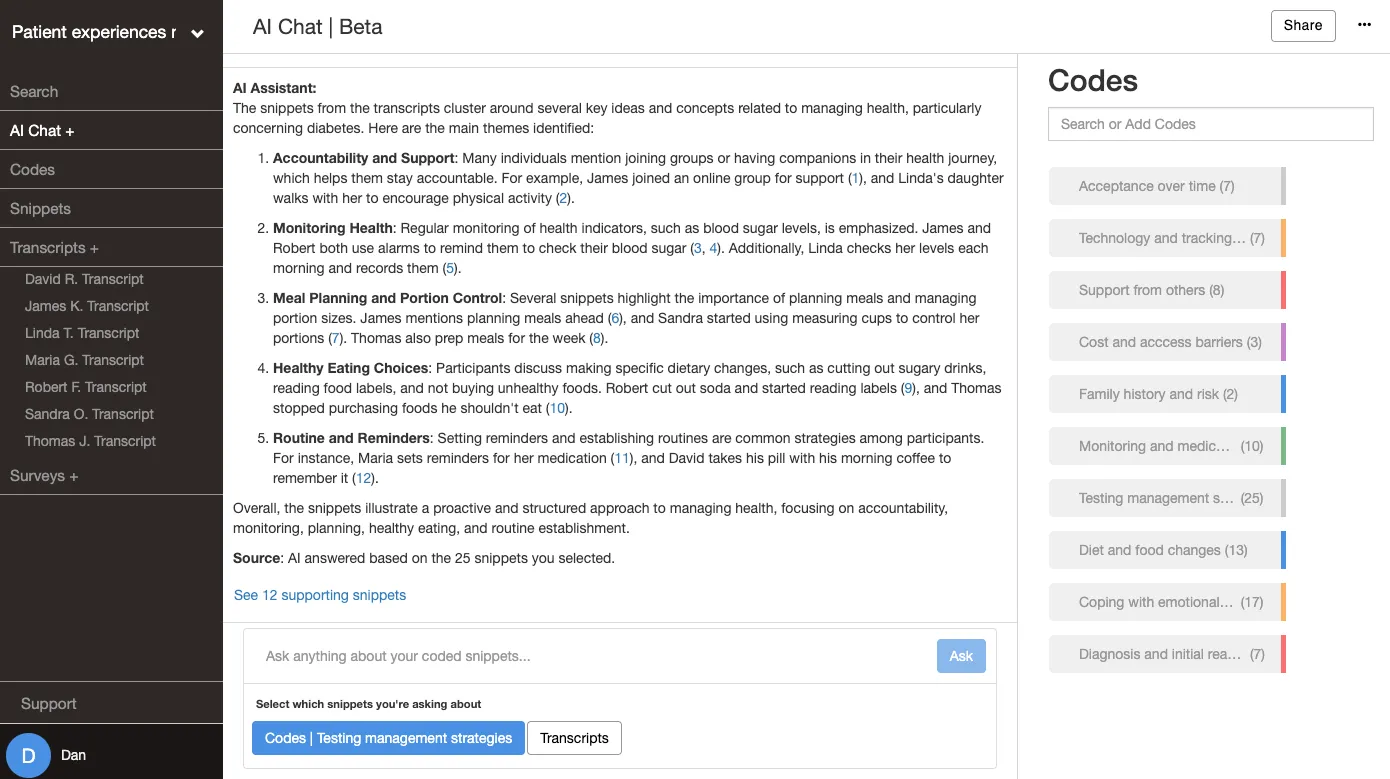
Summarize a code. Filter to a tight, well-defined code like “Diet and food changes” and ask what the snippets cluster around. You’ll get a focused breakdown of what’s there.
Sample prompt: “Summarize the main ideas across the snippets in this code (Diet and food changes). What are they clustering around?”
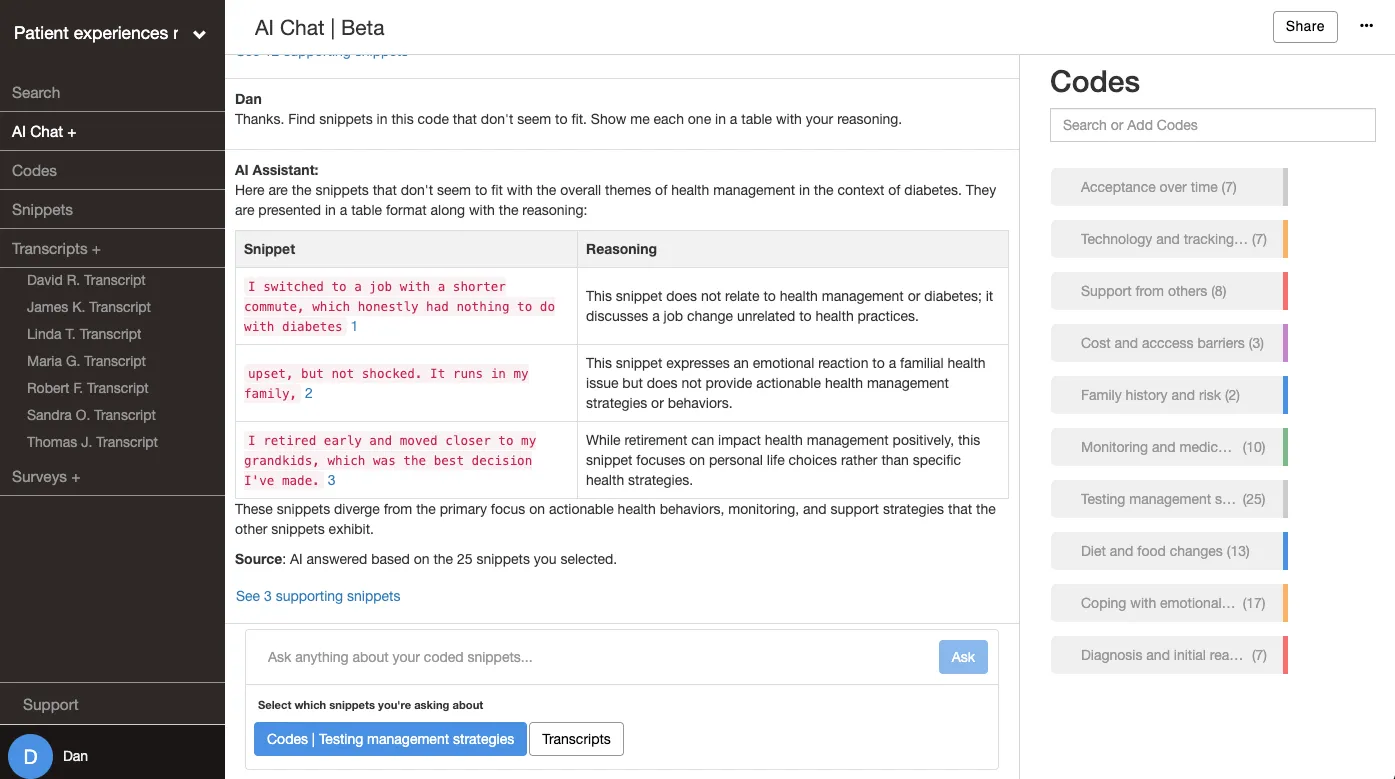
Find the snippets that don’t fit. If a code is getting too big and loose, ask AI to show you excerpts that seem out of place. The reasoning is the useful part, and it’s where you catch a code that’s drifted as you applied it in different transcripts.
Sample prompt: “Find snippets in this code (Testing management strategies) that don’t seem to fit. Show me each one in a table with your reasoning.”
Break a big code into subcodes. When a code like “Testing management strategies” holds more snippets than it should, ask for subcodes with names, descriptions, and the snippets under each. Treat the result as a first draft to discuss with, then build the ones that hold. Once you’ve split it, nesting the new subcodes under the parent and color coding them keeps the structure easy to scan as your codebook grows.
Sample prompt: “Break this code (Testing management strategies) into subcodes. For each, give me a name, a brief description, and the snippets that belong under it. Put it in a table.”
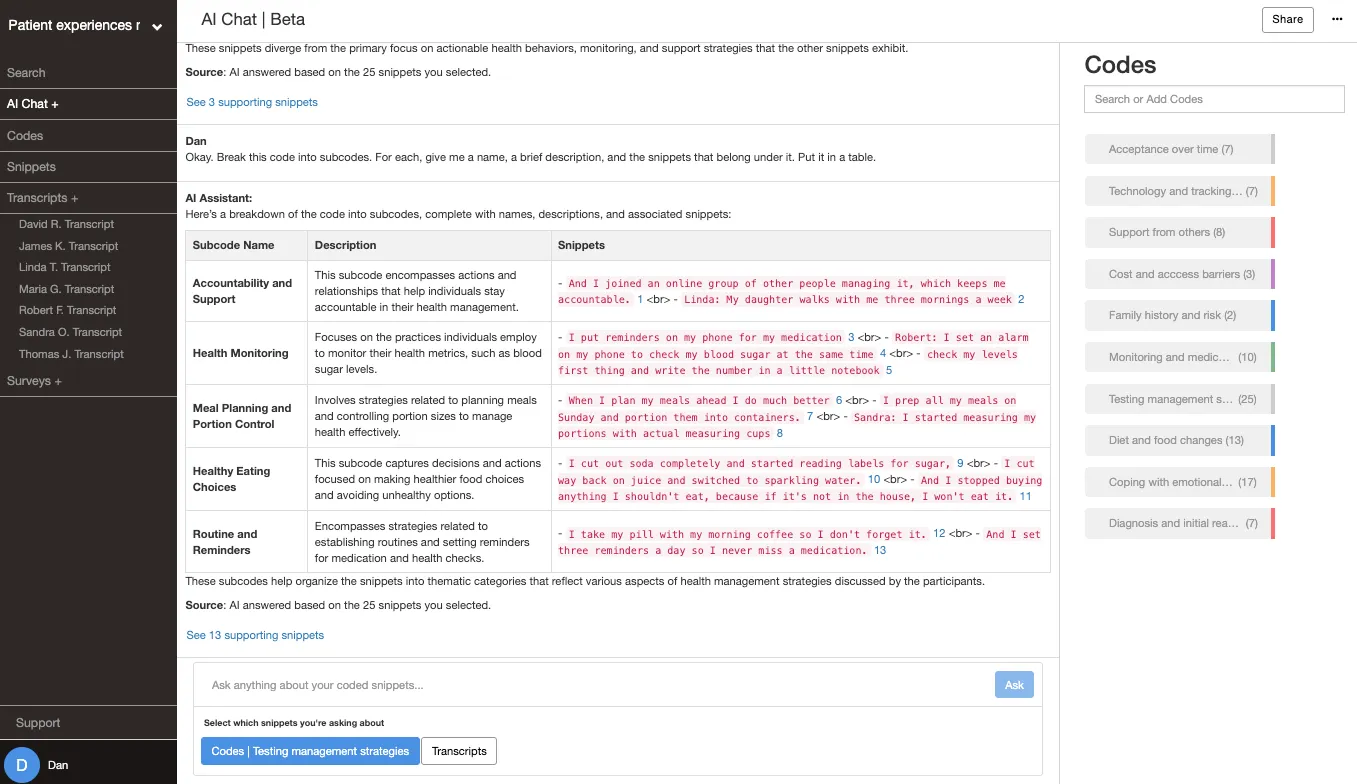
Say the AI suggests subcodes like Routine and Reminders, Healthy Eating Choices, and Accountability and Support. You can then drag them under Testing management strategies so they nest as children of the parent code. After adding the new codes, you can sort the bloated parent code into those more specific buckets.
Ask one focused question. Skip the whole-project query and ask something pointed, like whether a code is pulling in two directions. Narrow questions get clearer answers.
Sample prompt: “Are the snippets in this code describing one idea, or are a few different things going on? What would you separate out?”
Remember these are just suggestions. AI Chat won’t reorganize your codebook for you. When a focused question shows two codes saying the same thing, you merge them yourself. When a summary or an outlier check shows one code holding several ideas, you split it into subcodes and nest them under the parent.
How AI helps you find weak spots in your data
That habit of being the final decision-maker can also lead somewhere you might not expect. Sometimes the answers you get from AI tell you that you’re not ready to write yet.
That insight usually happens right when you think you’re done. You run a couple of prompts to check your codes, and the summary comes back vague or the subcode breakdown reveals three different ideas filed under one label. That tells you it’s time for another pass through the transcripts before you write.
That’s the AI helping you find weak spots in your project. A vague summary or a messy split is an early red flag you’d rather spot now than hear from a committee or peer-debriefer later. Another round of coding gives you tighter codes, clearer themes, and a write-up you can stand behind. These prompts won’t speed up your writing so much as give you firmer ground to write from.
The same skill at every stage
The three features read different material, but they reward the same habit. You want prompts to be specific, give context, and treat what comes back as something to judge rather than accept.
| Stage | Where you prompt | What it reads | A good first prompt |
|---|---|---|---|
| Getting started | Transcript AI (transcript page) | Current transcript + your codebook | ”Suggest some initial codes for this transcript.” |
| Applying your codebook | Apply Codes Using AI | Your code names + descriptions | (AI relies on your code descriptions, so leave as little room for interpretation as possible.) |
| Exploring coded data | AI Chat (left menu) | Your coded snippets, filtered for best results | ”Summarize the main ideas in this code.” |
AI prompts to save (and make your own)
Here’s a starting set of prompts, grouped by where you’d use each one. Copy them, swap in your own codes and patterns, and build from there.
Getting started in Transcript AI
- “Suggest some initial codes for this transcript.”
- “Summarize this interview in three sentences.”
Exploring a code in AI Chat
- “Summarize the main ideas in this code. What are they clustering around?”
- “Summarize this code, focusing on [a pattern you’ve noticed in the data].”
- “Give me a few representative quotes for this code.”
Cleaning up a code in AI Chat
- “Find snippets in this code that don’t seem to fit. Show me each one in a table with your reasoning.”
- “Break this code into subcodes with names, descriptions, and the snippets under each. Put it in a table.”
- “Are the snippets in this code describing one idea, or several? What would you separate out?”
Changing the format of any answer
- “Rewrite that answer as a table with snippet citations.”
These prompts can help from building first codes to final cleanup. Our guide to seven ways researchers use AI in qualitative research walks through other ways researchers are using these AI tools in their work.
Try Delve AI on your own transcripts
Prompting gets easier when the system is built for the work. Instead of copying transcripts into a chatbot and pasting answers back, your codes, snippets, and source citations stay in one place, and AI Chat links every answer to the quote it came from so you can check it. Start a 14 day free trial of Delve.

These three AI features come stock with every Delve plan. There are no paid add-ons like you get with other AI qualitative coding tools.
