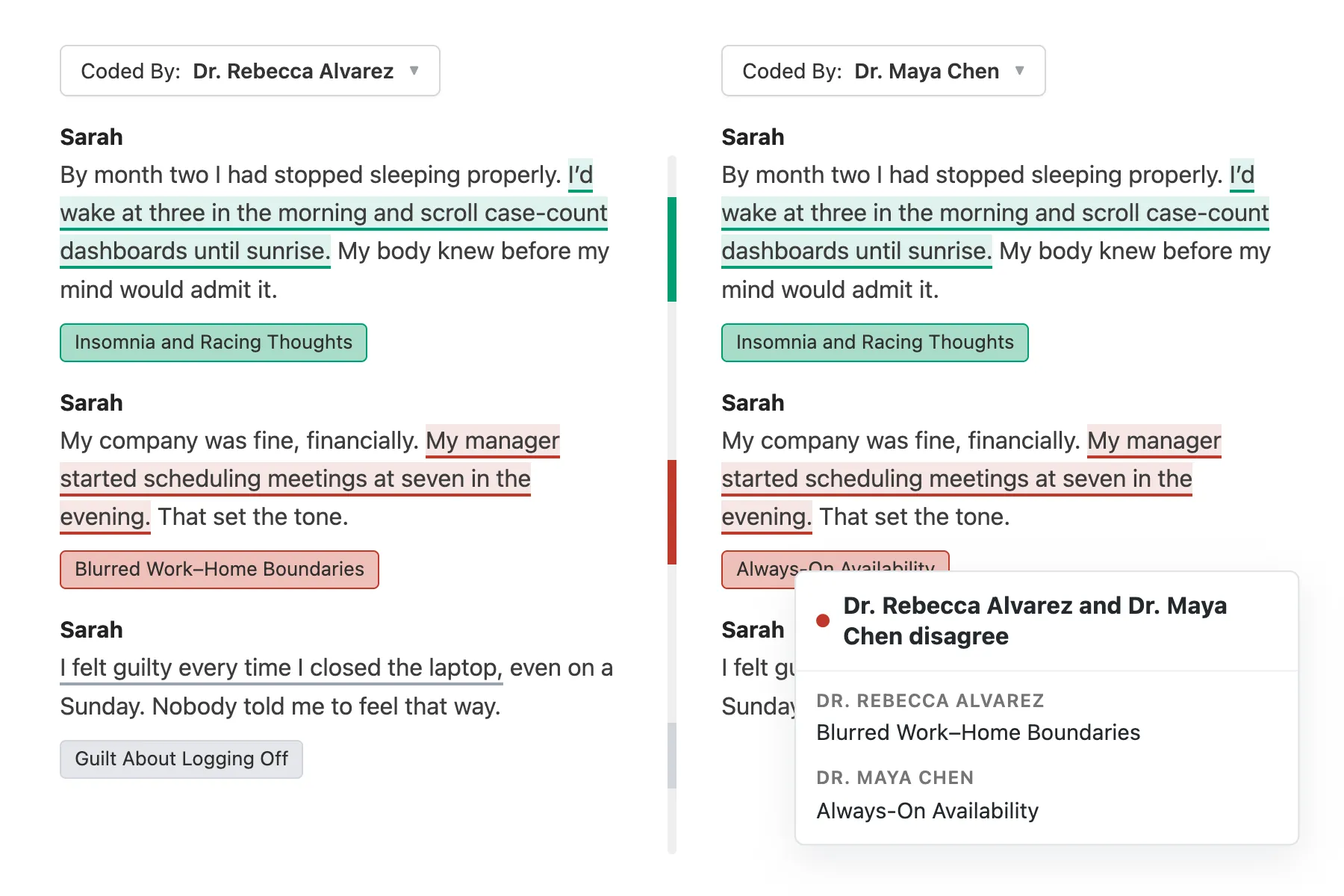
In consensus coding, everyone on your team codes the same transcript. Then you meet to compare. The meeting exists to understand why (for example) one person read a passage as “Blurred Work–Home Boundaries” and another as “Always-On Availability.” A difference like that usually points to an assumption, or a code definition, that your team hasn’t talked through yet.
Before you can have that conversation, you have to find the passages where you read the data differently. Until now that meant a lot of scrolling through a transcript, playing a qualitative version of the game “Spot the Difference.”
The Coding Comparison page now makes it so much easier to understand if and where your team disagrees. Every code and passage is colored by agreement, and a color-coded scroll bar down the middle shows the whole transcript at a glance. You can go straight to the disagreements and start the consensus conversation there.
Understanding the new colors
The colors should be self-explanatory, but here’s a quick breakdown:
- Green: you both applied the code to the same text.
- Light red: you agree on some of the codes for that text and disagree on others.
- Red: the other person coded that text with something else entirely.
- Gray: only one person coded that passage, so there’s nothing to compare.
Hover over any code or passage to see more details.
From here you can focus on the question the meeting is for: why did your team interpret the transcript differently? Depending on the answer, you might adjust your codebook, sharpen a code definition, or simply align.
Jump to the next disagreement
A long interview can have a lot of agreement in it. You shouldn’t have to read through all of it to find the next sticking point. The color-coded scroll bar between the two columns shows where your team agrees and disagrees across the entire transcript, top to bottom. It also shows you, before you start, whether you mostly agreed on this transcript or mostly disagreed.
Click any part of the scroll bar to jump to that spot in the transcript. You see the whole transcript at a glance, and you can go to any point whenever you want.
This also works well with intercoder reliability: the score tells you how much you agree, and the scroll bar shows you where.
Try it with your team
This is the second round of improvements we have brought to the coding comparison page this year. In July, we made it possible to quickly fix disagreements without leaving the page, and now understanding those disagreements in the first place is a lot easier. Both came from requests from Delve users, so thank you to everyone who sent them in.
More soon,
Alex
Co-founder, Delve