This is part of our Ultimate Guide to Comparing Qualitative Software | Take Our Free Online Qualitative Data Analysis Course | Start a Free Trial of Delve
Grounded theory is a research method where you build theory directly from data. You make sense of what your participants say by coding your data, and look for patterns across transcripts. You code and compare data then sample data again based on what you learn until new data stops adding anything new.
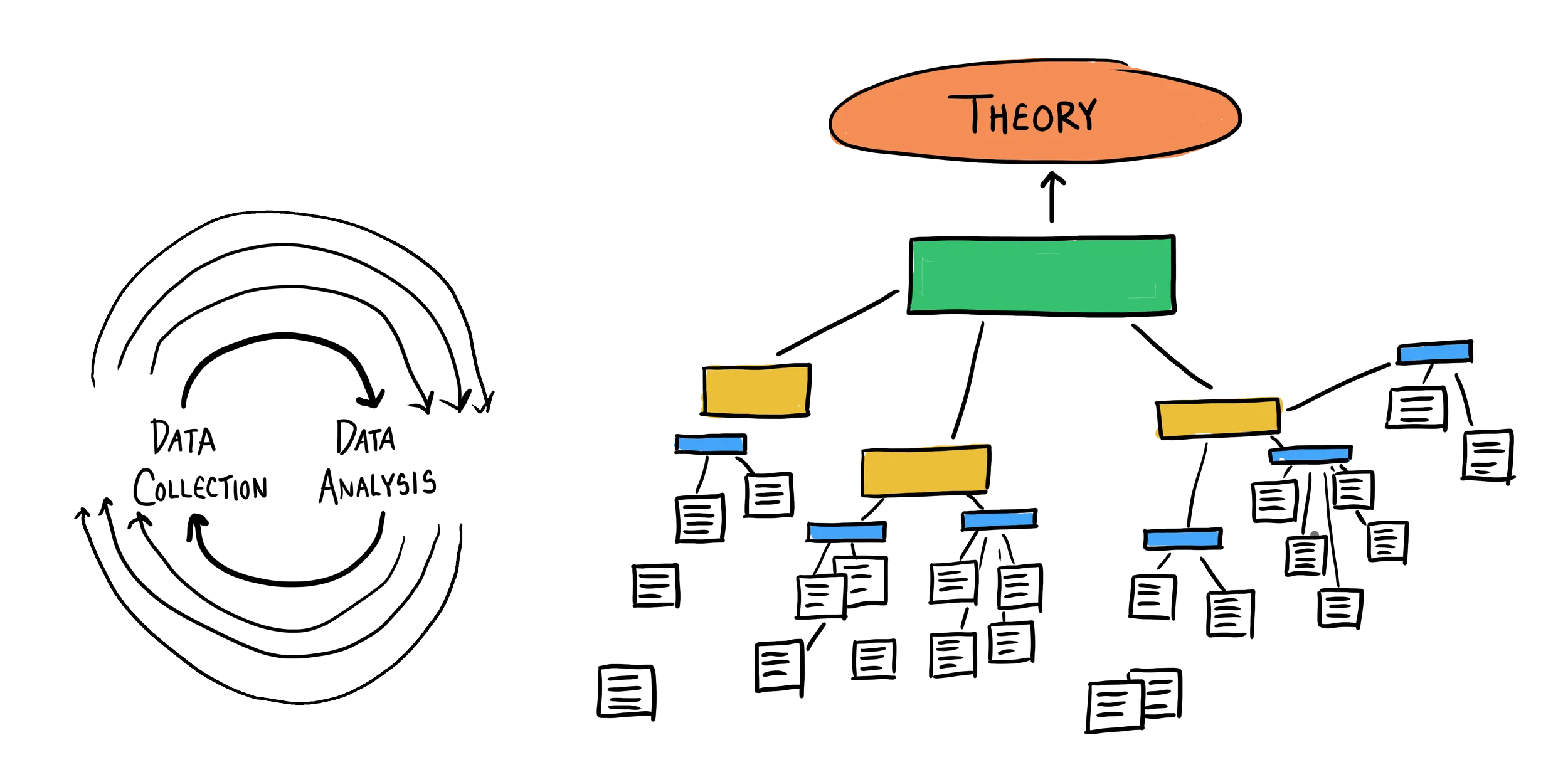
Qualitative software that adds more work at any one of those points slows down the whole project. We tested seven QDA tools to find out which ones handle the back and forth of grounded theory the best.
How to choose software for grounded theory
Grounded theory puts software under a specific kind of pressure with specific expectations you may not have in other projects.

Before comparing tools, focus on three things:
- Can I organize codes and memos in one place? Open, axial, and selective coding means your code structure evolves across rounds, and memos need to stay tied to the specific data that prompted them. You need to drag codes into categories, merge overlapping ones, and find related memos without clicking through the whole project.
- Can I iteratively add new transcripts as I go ? Theoretical sampling means your data collection responds to what you’re finding analytically. You should be able to drop in a new transcript to the project, apply existing codes, and continue without restructuring everything you’ve built.
- Can I compare how a code holds across all my transcripts? Constant comparison means regularly going back and forth to check patterns across your whole dataset as you code. That should be as easy as possible, not something you piece together across multiple windows.
We coded the same set of transcripts across all seven platforms to see how each one handled grounded theory. Here’s what stood out.
Comparing the best grounded theory software
Here’s how each qualitative tool handled and forth grounded theory workflow:
NVivo
NVivo for grounded theory: Feature-heavy with heavy training
Getting NVivo to where you can code in confidence takes a long time. The setup alone involves picking between multiple versions and download options. Once installed, understanding where everything lives takes real time. As one researcher put it, “you need a whole course to learn to work with it.”
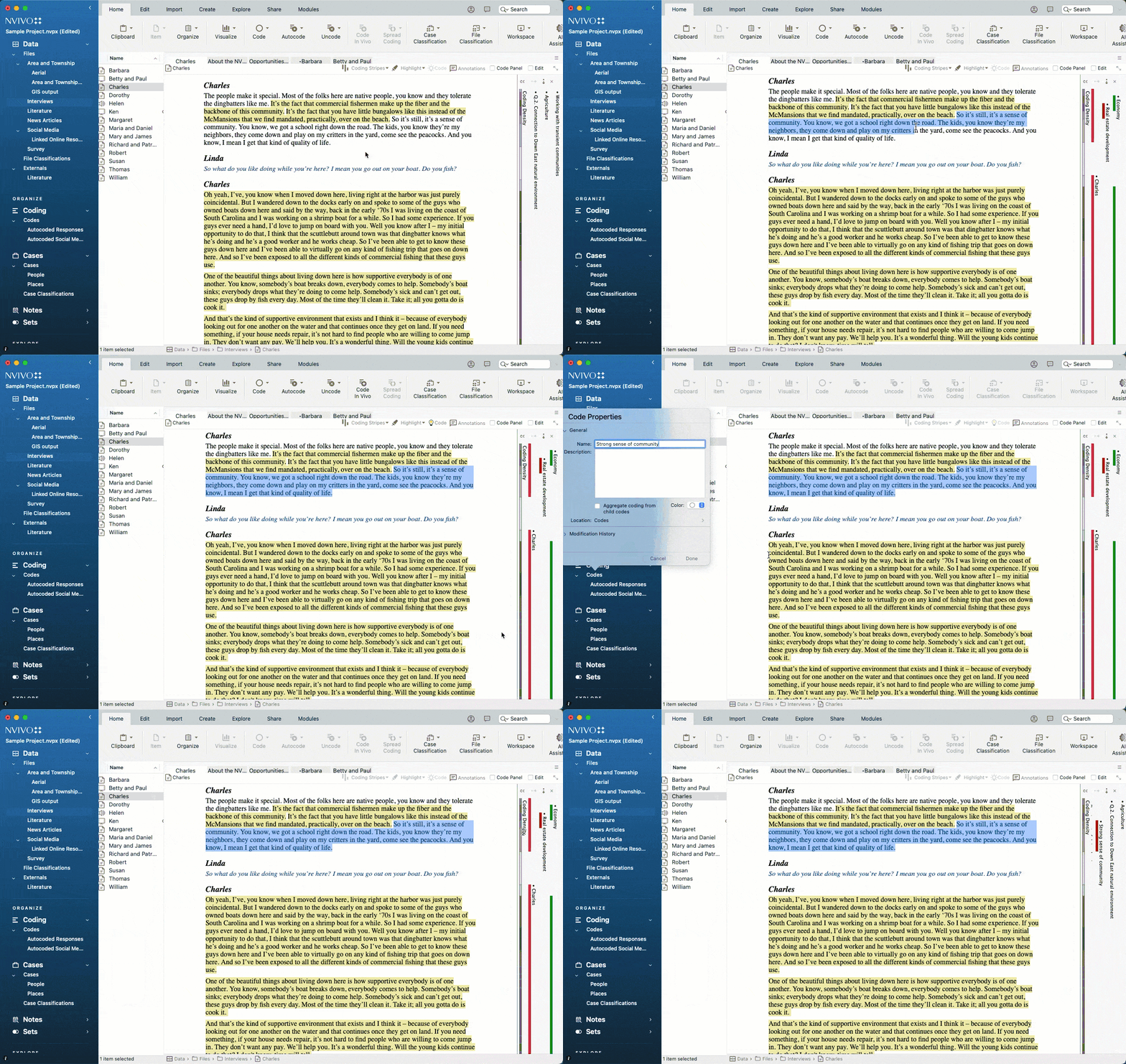
For long-running research projects with enough training, the investment and power features can be worth it. You can build out hierarchical code structures and reorganize them as your analysis deepens. Multiple memo types attach directly to nodes The Matrix queries tool lets you see how a code appears across all your transcripts at once. But for a method that asks you to move quickly between data collection and analysis, all this training slows you down.
You can batch upload new Word or PDF files into your project as they’re ready. On the desktop version, everything lives in a local project file, so if you’re collaborating or adding data while others are working, you’ll need to manually sync the project each time. NVivo Cloud makes that easier, but it costs extra.
- Best for: Large funded projects with training budgets and IT support.
- Price: Desktop licenses $1,195-2,038 per researcher annually. Cloud collaboration adds more.
For a method that asks you to move quickly between data collection and analysis, all this training slows you down.
ATLAS.ti
ATLAS.ti for grounded theory: Deep roots, steep path to productivity
ATLAS.ti has documented roots in grounded theory, and it shows in how the features were designed. Your memos link directly to quotations so you can easily review the underlying data. But like NVivo, memos come with multiple category types to manage. The Networks view for mapping relationships between codes and categories adds another layer to learn before you can start coding in earnest.
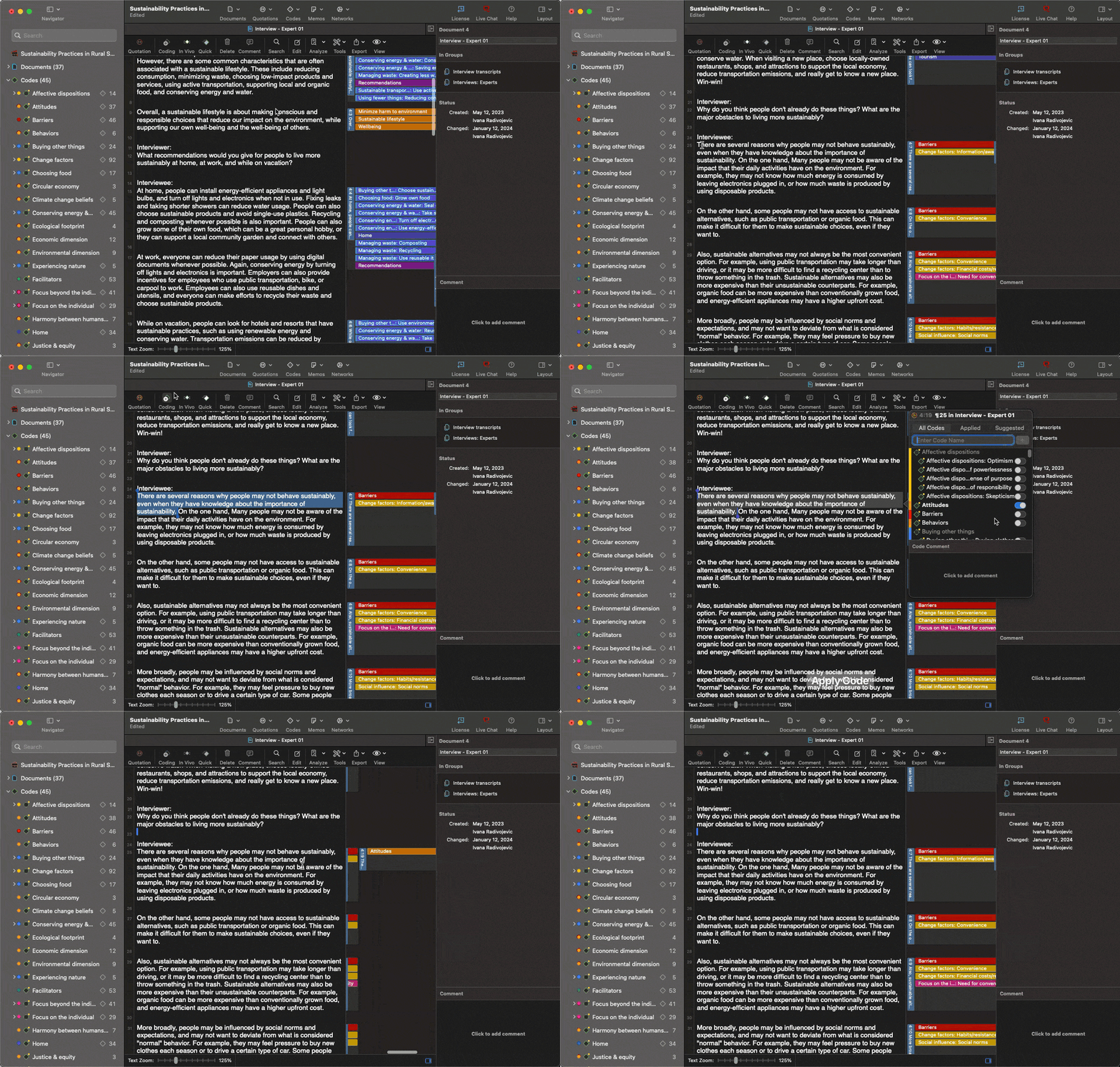
Memos connect directly to quotations in your data, and the Networks view lets you draw relationships between codes and categories as your theory develops. Once you know the platform, running a query to see how a code holds across your whole dataset is straightforward. The trade-off is you pick either the desktop or web version and commit – the web version is easier to access but lacks features like Networks, which is one of the tools that makes ATLAS.ti genuinely useful for grounded theory.
Adding new transcripts is quick on either version. On desktop, the project lives in a local file, so collaborating means sharing and syncing that file manually each time new data comes in (same issue as NVivo). The web version is easier for teams but you lose some of the GT-specific features in the trade-off.
- Best for: Teams with time for training who need advanced analysis features.
- Price: Desktop $895 per researcher. Web $120 annually.
MAXQDA
MAXQDA for grounded theory: the most deliberate methodology mapping
MAXQDA sits between NVivo and ATLAS.ti in complexity. There are more features than most researchers will use, but the interface is cleaner and the learning curve is less punishing. The documentation is solid and the tutorials move faster than NVivo’s.
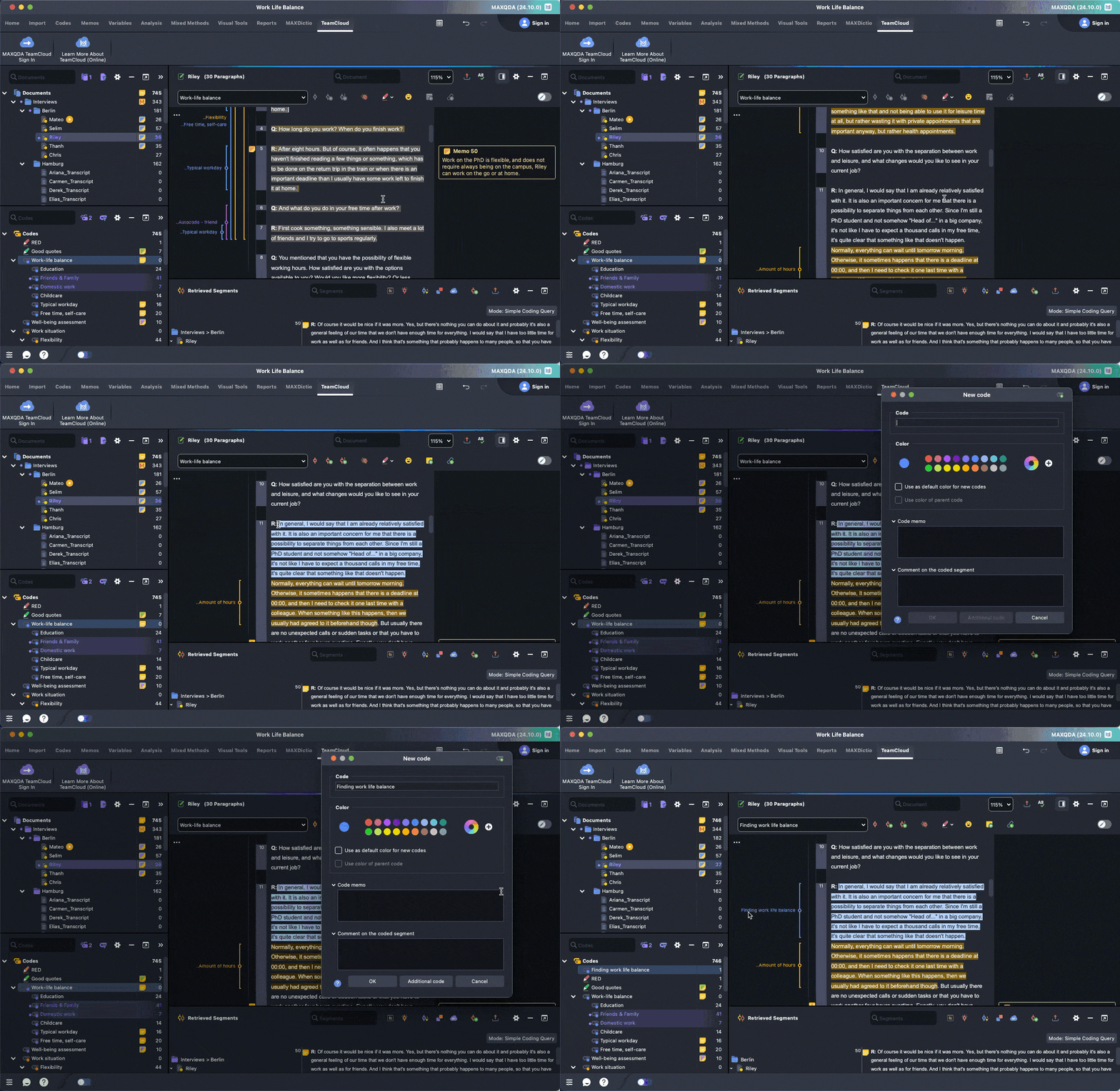
The Open Coding Mode flags similar existing codes as you work, so you can avoid duplication across rounds of open, axial, and selective coding. Memo categories keep theoretical and methodological notes separate and tied to your data. The Code Matrix Browser shows how codes distribute across all your transcripts, which makes constant comparison flow easier without jumping between windows.
It hits a middle ground the other legacy platforms don’t quite manage. It’s more methodologically deliberate than NVivo, more approachable than ATLAS.ti at its most complex. The trade-off is it’s still desktop-based, takes days to learn, and collaboration comes as a separate add-on.
- Best for: Projects with training time and collaboration budgets.
- Price: Standard licenses $600-800. TeamCloud adds $600-800 annually.
Delve
Delve for grounded theory: purpose-built for the method, faster to learn
Delve has built its grounded theory content and workflow together. The Practical Guide to Grounded Theory covers the full method with Delve’s features threaded throughout, and the Sage Research Methods Community hosts a dedicated Delve grounded theory walkthrough.
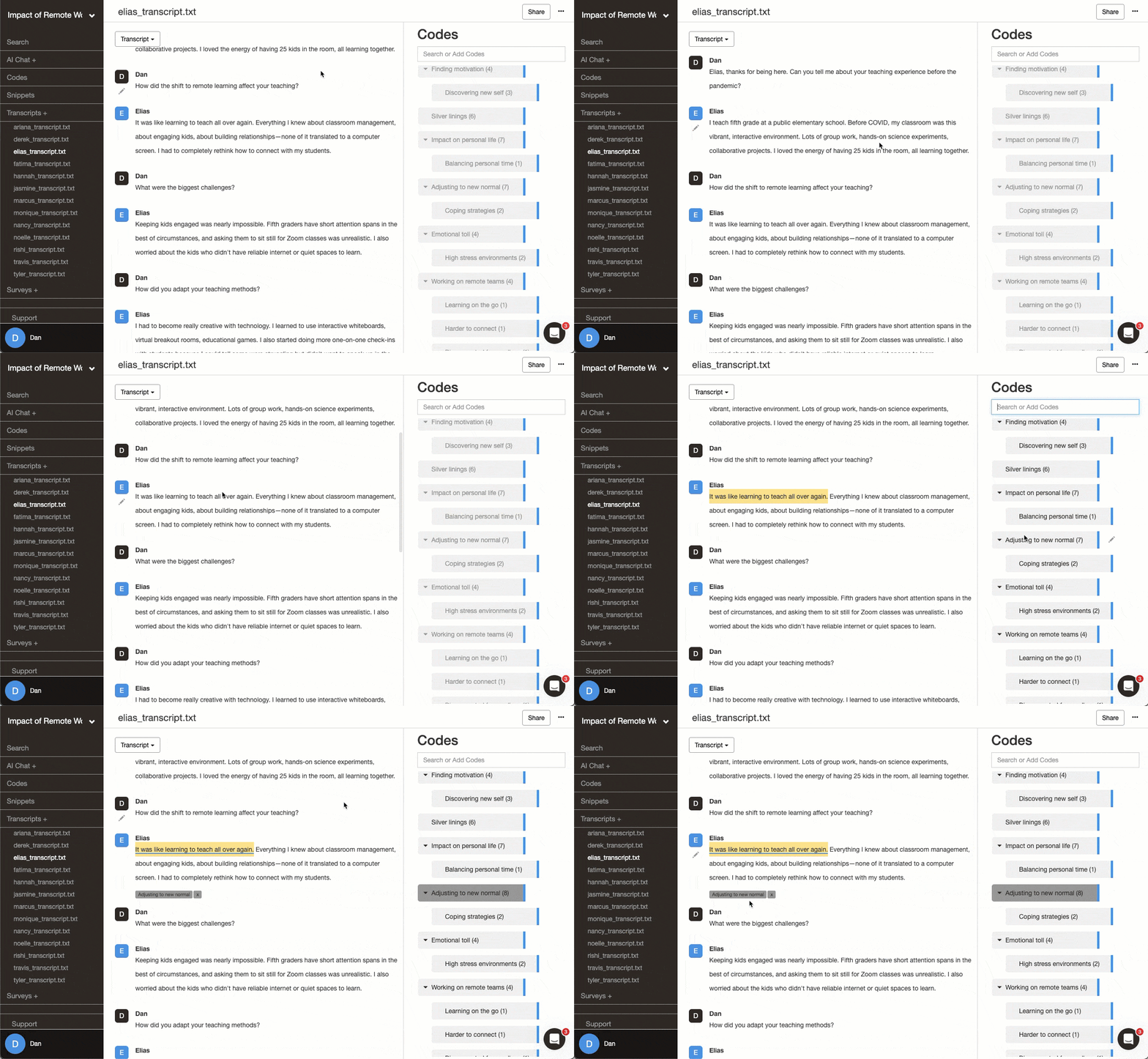
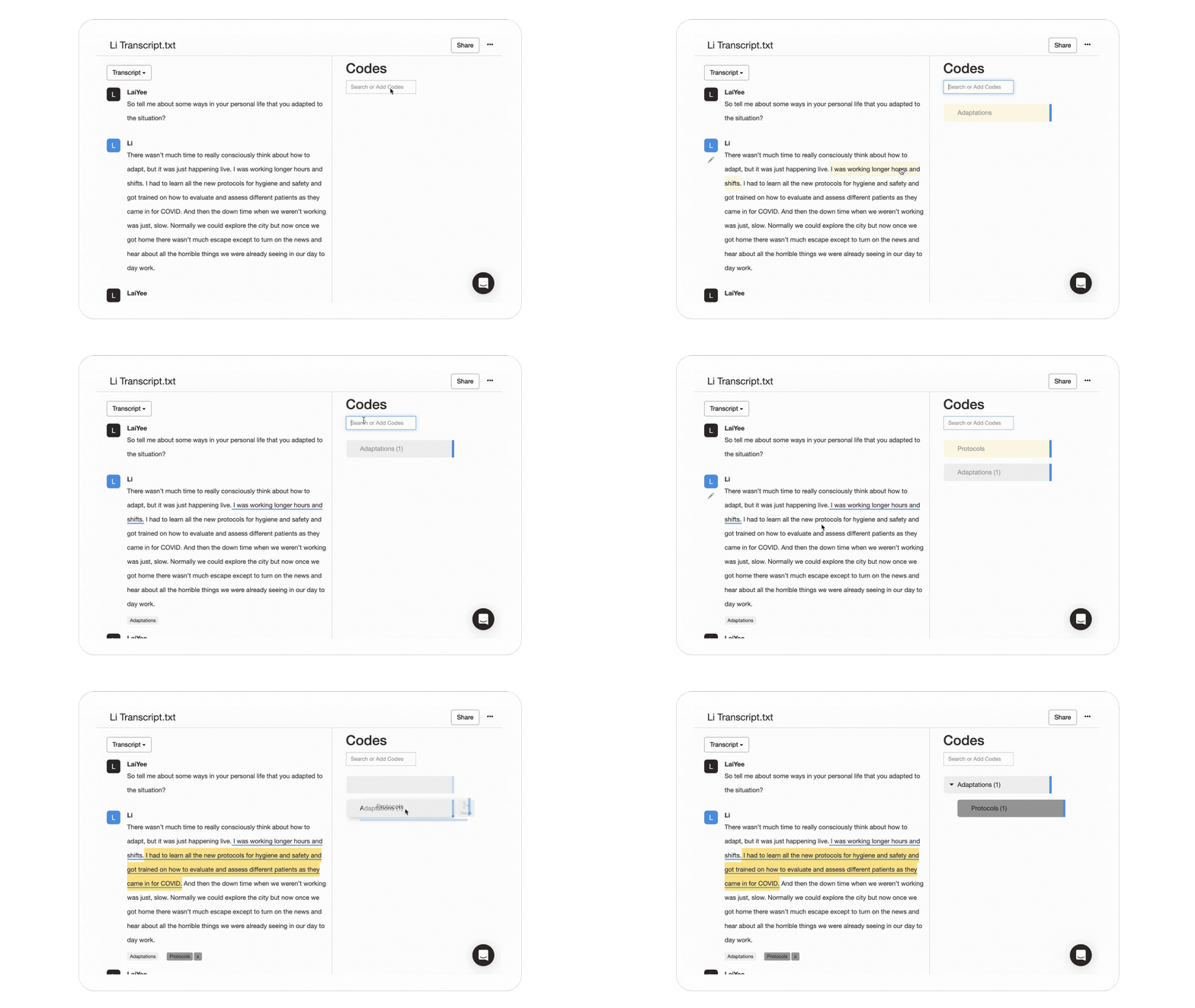
Nesting codes with drag-and-drop lets you move from open codes into axial categories and toward a core concept without losing the excerpts behind them. When you move into a new round of theoretical sampling, adding a transcript is straightforward and your existing codes are immediately available. Memos attach directly to snippets and codes, so your analytical notes are tied to the specific data that prompted them. And filtering snippets by code across all your transcripts gives you a clean view for constant comparison without switching between windows.
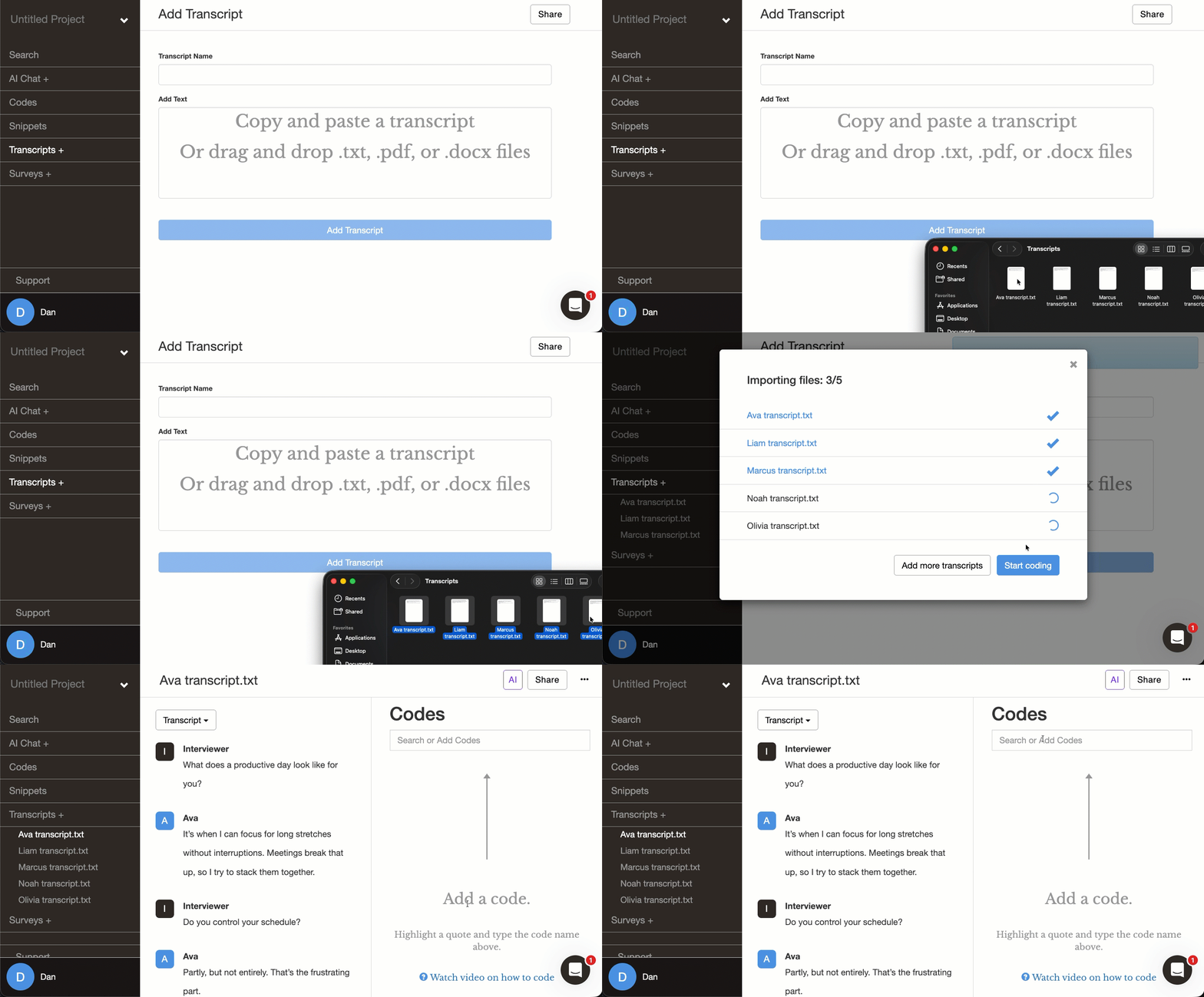
Importing new transcripts is as easy as it gets. You can drag and drop multiple .txt, .pdf, or .docx files into the project at once, and your existing codes are ready to apply immediately. Since Delve is web-based, there’s no local file to sync, no extra steps if you’re working with others, and no version to manage.
- Best for: Dissertation students. Teams doing collaborative thematic analysis. First-time researchers.
- Price: Starts at $50/month. Student pricing $18/month. Free 14-day trial.
Quirkos
Quirkos for grounded theory: Accessible but limited as projects grow
Quirkos names grounded theory directly on its homepage and has published posts on open coding, axial coding, and the constant comparative method. The bubble canvas style is different from the other tools on this list. Codes appear as growing circles rather than hierarchical lists, and the visual feedback can help you see what’s accumulating in your data during open coding.
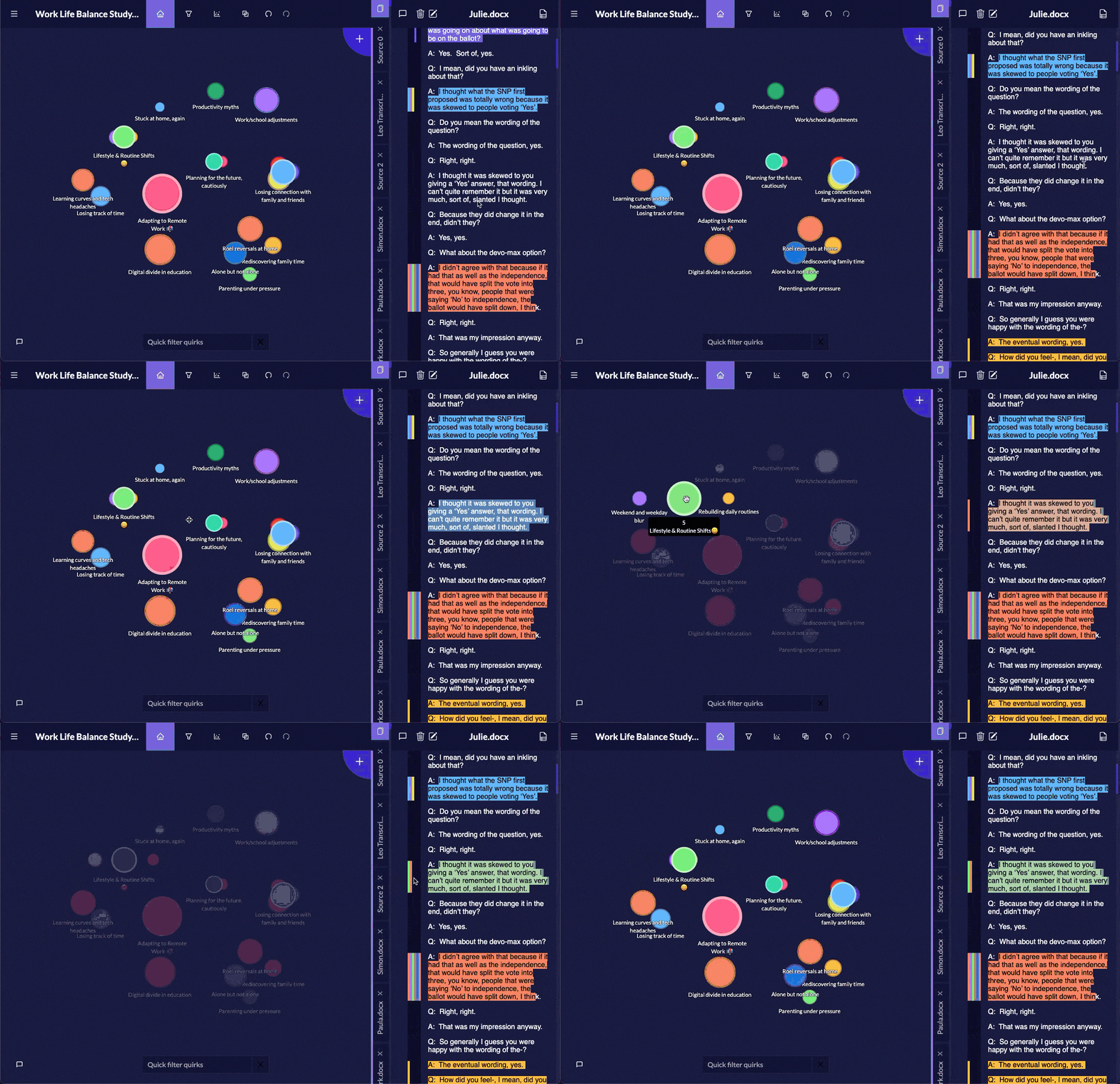
Memos attach as sticky notes to passages. The Overlap view shows where codes co-occur, giving you a way to run basic constant comparison across your dataset. What helps in the early rounds becomes harder to manage as the project grows. The canvas layout gets crowded as your codebook develops, and the platform is text-only at a modest scale.
Adding new documents is simple and codes carry over automatically. But we did run into a file import issue during testing: uploading the wrong file type imported every cell as a separate entry with no batch delete to fix it. Double-checking your file types before importing may avoid similar issues.
- Best for: Visual thinkers with straightforward coding frameworks.
- Price: Licenses start around $400. Academic discounts available.
Taguette
Taguette for grounded theory: Free to use, missing key features
Taguette is free and open-source. Getting it running takes some patience – the desktop version triggered security warnings during our testing that sent us to the web version instead, and the local version requires keeping a terminal window open while you work. When we closed it, the program stopped running.
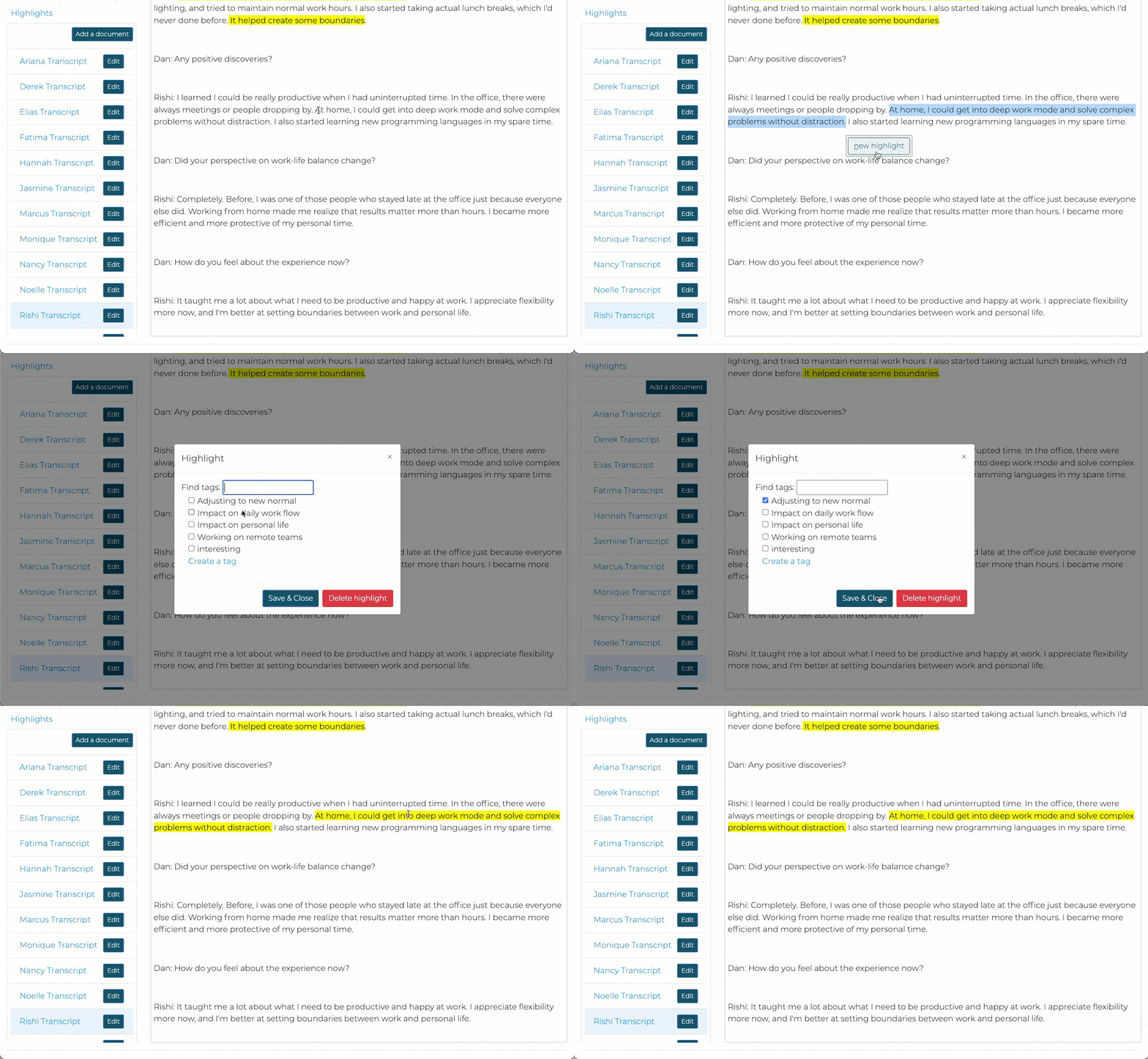
Once you’re in, the interface works like a digital highlighter, which makes basic coding easy. But codes don’t display in the margins while you read a transcript. You have to navigate to a separate highlights tab to see what’s been coded where. That makes it harder to notice patterns as you move through your data, which is exactly what grounded theory asks you to do continuously. There’s no way to nest or layer codes into hierarchies, so there’s no real path from open codes through axial categories to a core concept.
You have to upload transcripts one at a time with no batch option, which slows down data collection for theoretical sampling. Seeing how a code holds across your whole dataset means going through each transcript manually. For a method built on continuous comparison, the extra clicking adds up.
- Best for: Quick projects with stable themes and minimal reorganization.
- Price: Free and open source.
Dedoose
Dedoose for grounded theory: Mixed methods focus, limited for GT
Dedoose is browser-based with no download needed, which simplifies access. But when you open a project, six panels compete for attention at once. Charts, codes, and filters are all visible from the start. The tool is built for researchers who need to link qualitative codes with quantitative demographic data, and that orientation shapes everything about how it works.
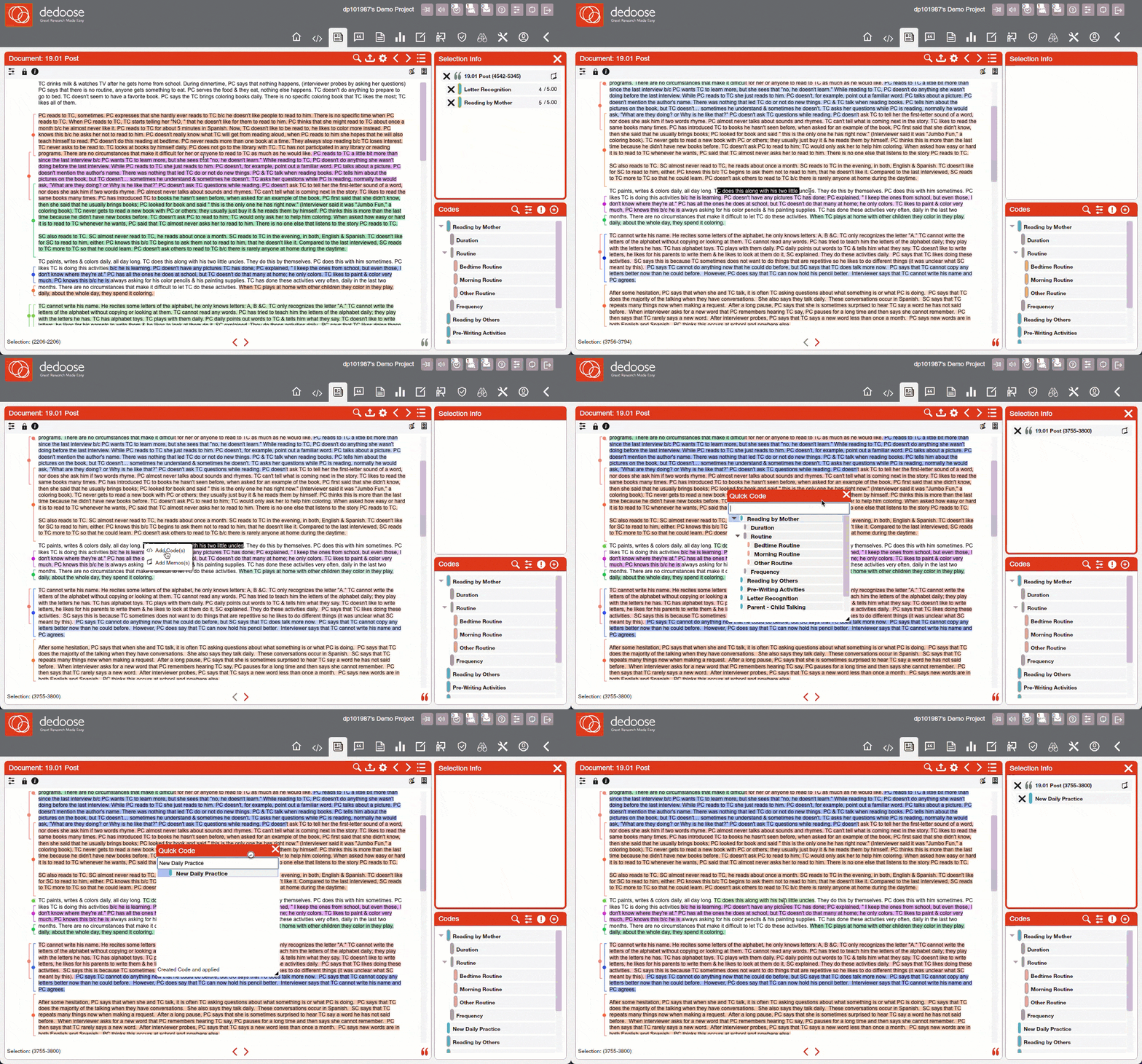
The memo system works and attaches to coded excerpts, but finding a memo from weeks ago requires clicking through multiple prompts rather than clicking directly from a code. The filtering system, which controls what you see when comparing a code across transcripts, caused enough confusion in our testing that excerpts appeared to disappear entirely when filters shifted. This was the biggest timesink for us.
Adding new data is straightforward since everything lives in the cloud. Your code structure carries over when you drop in a new transcript. The main friction isn’t the upload but knowing the platform well enough to navigate it quickly across multiple rounds of theoretical sampling.
- Best for: Researchers comfortable with complex interfaces and steep learning curves.
- Price: Subscriptions start at $12.95/month for individuals.
Read Dedoose reviews on G2 | Read Dedoose reviews on Capterra
Table: Compare NVivo, ATLAS.ti, MAXQDA, Delve and more
| Feature | Delve ✓ | Taguette | Dedoose | Quirkos | MAXQDA | ATLAS.ti | NVivo |
|---|---|---|---|---|---|---|---|
| Platform access | Web-only | Web + desktop download | Desktop app with cloud data | Desktop | Desktop (Windows/Mac) | Desktop + web (limited features) | Desktop + cloud collaboration |
| Setup time | 10 minutes (web-based setup) | 45 minutes (web version) | 30 minutes (download + setup) | 45 minutes (unfamiliar interface) | 3–4 days (moderate learning) | 2–3 days (installation + training) | 5–7 days (complex interface) |
| Adding a code | 2–3 clicks (streamlined) | 3–4 clicks (similar process) | 2–3 clicks (spreadsheet-like) | 1–2 clicks (drag to bubble) | 3–4 clicks (moderate complexity) | 3–5 clicks (multiple methods) | 4–6 clicks (complex menus) |
| Adding transcripts mid-project | Drag-and-drop batch upload, no syncing needed | One at a time, no batch import | Cloud-based, straightforward upload | Simple import, codes carry over | Batch upload, manual sync for collaboration | Desktop: manual sync; web: easier but fewer features | Batch upload; Cloud sync costs extra |
| Learning curve | Gentle (focused approach) | Minimal (basic functionality) | Moderate (corporate interface) | Minimal (visual simplicity) | Moderate (balanced approach) | Steep (comprehensive features) | Very steep (enterprise complexity) |
| Best suited for | Most GT projects, all skill levels | Basic tagging only, not suited for full GT workflow | Mixed-methods GT research | Beginners, small text-based datasets | Established researchers with training time | Complex GT projects, experienced users | Large funded projects, multimedia GT research |
📊 Quick comparison summary
→ Want to compare how easy it is to pick up each tool? Check out our learning curve breakdown and our collaboration feature comparison.
Final verdict: Use Delve for grounded theory
Delve is geared towards grounded theory. The Practical Guide to Grounded Theory, training videos, and YouTube channel all show how the software fits the GT process. The AI tools that come with all subscriptions can help brainstorm initial codes, pick out patterns across large amount of data, or point out connections you might have missed. AI can be involved as much or as little as you prefer.
![Intro to Grounded Theory Analysis with Delve [Webinar Recording]](https://i.ytimg.com/vi/0wcv4amjkf0/maxresdefault.jpg)
Delve is designed for every stage of your grounded theory research:
- Open coding: Generate codes quickly without days or weeks of training
- Axial coding: Drag and drop codes into categories and trace connections in a few clicks
- Selective coding: Codes and memos are tied to the source data so nothing needs reorganizing
Ready to start your grounded theory project? Try Delve free for 14 days.
No credit card required. Cancel anytime.
Related resources
Software comparisons:
- Which QDA Software is Easiest to Learn?
- Best QDA Software for Collaborative Research
- Customer Support in QDA Software
- AI Features in QDA Tools
Head-to-head comparisons:
- ATLAS.ti vs. NVivo vs. Delve
- ATLAS.ti vs. Dedoose vs. Delve
- MAXQDA vs. NVivo vs. Delve
- Dedoose vs. NVivo vs. Delve
- NVivo vs. Quirkos vs. Delve
Grounded theory guides: